Module List
If you just want to see an easy to copy simple list of all modules in a rack click on Show -> Module List on your Rack view page.
Beep, Bopp, Bleep: info@modulargrid.net


If you just want to see an easy to copy simple list of all modules in a rack click on Show -> Module List on your Rack view page.
Beep, Bopp, Bleep: info@modulargrid.net
Following the recent phishing attemps, we have strengthened our anti-phishing measures.
It is no longer possible to register accounts with usernames such as “Support” or similar variations. In addition, private messages are now checked for suspicious links.
Beep, Bopp, Bleep: info@modulargrid.net
With the new Rackommend feature, you can view a breakdown of the functions in your rack - such as VCAs, oscillators, and filters - and get recommendations for modules that fill in missing functionality or that one empty slot.
Rackommend suggests suitable modules based on the ones already in your rack. Simply click a function tag to start a matching search. Most of the search settings are preserved, so you can, for example, limit recommendations to a specific manufacturer. The brave can skip straight to the Add a Module button.
To create the Meta ModularGrid Rack, we analyzed the distribution of module types across all ModularGrid racks. Rackommend compares your rack against this statistical meta rack and highlights which functions are over- or underrepresented. You can then add a suitable module that fills the gap while also fitting the available width.
Take it with a grain of salt, of course - and build whatever makes you happy.
No AI. Just statistics.
Because this feature is computationally expensive, it is available exclusively to Unicorn users.
Beep, Bopp, Bleep: info@modulargrid.net
We are still being targeted by scammers who use the ModularGrid messenger to send phishing messages to users.
To reduce this problem, we’ve introduced an allowlist of the most common websites that can be linked in private messages. As a result, it should no longer be possible to include links to phishing sites.
This is admittedly a rather drastic measure, as the allowlist certainly won’t cover every legitimate website. However, we believe it’s a better approach than trying to maintain a denylist, which can never keep up with newly created phishing domains.
Unicorn users are currently exempt from this restriction because their accounts are not anonymous.
If a URL is blocked that you think should be allowed, please let me know via PM or at info@modulargrid.net so I can add it to the allowlist.
Beep, Bopp, Bleep: info@modulargrid.net
The message in- and outboxes now have a basic user filter. If you filter for a user and click through to the detail message, you can navigate prev and next in the user correspondence.
Beep, Bopp, Bleep: info@modulargrid.net
I deleted 600+ bot profiles that created racks only to link them to sketchy website. All those racks are gone too.
A serious setback for the Philippine escort scene and Dutch scam casinos.
There is a button on the bottom of the rackkommend stat table to copy the table in markdown format to the copy buffer.
Reddit r/modular will not be the same anymore.
Beep, Bopp, Bleep: info@modulargrid.net
This one is under the hood, but a necessary preparation for upcoming AI bot spam.
We now have an internal scoring system.
This means that new users can no longer add or modify public modules.
They can still upload private modules for their own use.
They cannot post in forums or create offers.
I am sure there will be issues, so if anyone thinks the system is too restrictive, PM me.
Beep, Bopp, Bleep: info@modulargrid.net
In the Messages inbox and outbox, in the right-column action menu, there is now a funnel icon that filters messages from the selected user.
Since scammers continue to target users on the Marketplace, I have added another layer of security: a VPN check.
Not every VPN user is a scammer, but virtually every scammer uses a VPN. From now on, when a user creates or edits an offer, we check whether the connection is being made through a VPN and display the result on the offer. I think it's fair that other users should have access to this information.
The VPN check is only an indicator and may not always be accurate.
Beep, Bopp, Bleep: info@modulargrid.net
You can now filter modules using the Show only passive checkbox. This will show modules that do not draw power from the power rail, such as mults and power supplies.
Beep, Bopp, Bleep: info@modulargrid.net
Adjacent modules can now be linked into a single block and moved together. Linked blocks stay connected when using Optimize Rack Space!
Finally your expander modules stay in place!
Beep, Bopp, Bleep: info@modulargrid.net
You can now search for modules by maximum depth. This is useful when planning a shallow skiff. Module depth is now also displayed alongside HP in the module search results.
Beep, Bopp, Bleep: info@modulargrid.net
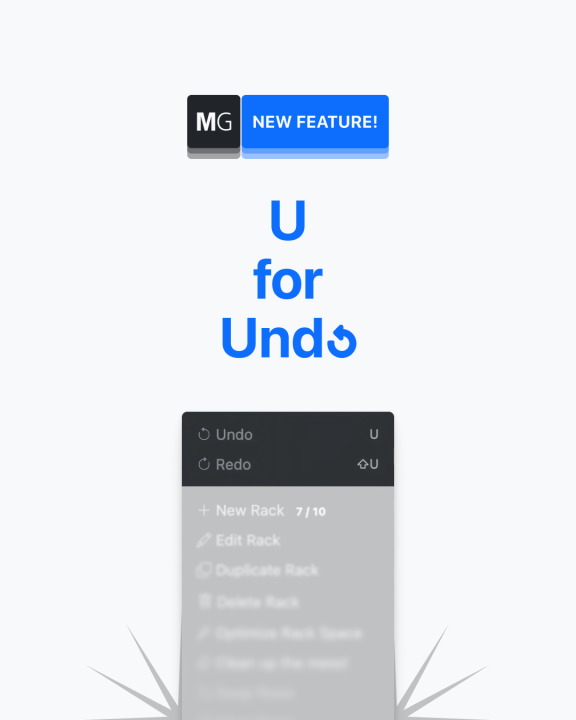
Not V for Vendetta but U for Undo!
You can undo module moves, additions, duplications and deletions, including movements involving linked modules or Fuzzy Swap.
Optimize Rack Space can also be undone, so experimenting with a different layout is a little less adventurous.
Find Undo and Redo at the top of the Edit menu, or press U to undo and Shift + U to redo while keyboard shortcuts are enabled. Multiple steps are supported.
The history is kept for your current tab and resets when you reload the page. It covers module placement changes, not every rack setting.
Beep, Bopp, Bleep: info@modulargrid.net
Three 2HP modules, one 1U adapter!
Linked 3U modules with a combined width of up to 6HP can now rotate together and fit into a 26HP adapter in a 1U row.
Hover over a module in the group and use the flip button, or press F while keyboard shortcuts are enabled. The whole block rotates together, keeping the module order and relative panel orientations intact. It also stays linked when using Optimize Rack Space.
After rotating, drag the group into a 1U row. If you reload before placing it, the group will be waiting on the workbench.
To unlink or delete a member, rotate the group back upright first.
Beep, Bopp, Bleep: info@modulargrid.net
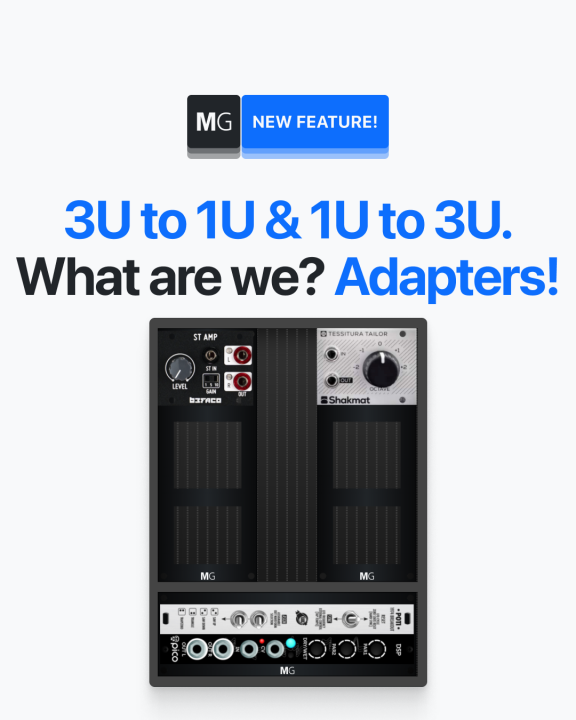
The previous update let you put 3U modules in a 1U adapter.
Now you can do it the other way around: put 1U modules in a 3U adapter!
It works much the same way:
1. Link up to three 1U modules.
2. Rotate them.
3. Place them in a 3U row.
Beep, Bopp, Bleep: info@modulargrid.net
Pulp Logic and Intellijel 1U modules now display their full panels with correct proportions, without awkward cropping.
Want to crop an image yourself? Use Crop Panel Image when adding or editing a module, then Apply and Save.
Beep, Bopp, Bleep: info@modulargrid.net
The internet is on fire today because of these PHP vulnerabilities. Thanks to Ondřej Surý, I’ve already patched the ModularGrid server, so we should be safe to continue our search for the best VCF.
Beep, Bopp, Bleep: info@modulargrid.net
Beep, Bopp, Bleep: info@modulargrid.net
The Image Editor now has two new tools for modules and pedals:
Both work alongside cropping. Preview your changes, click Apply, then Save to keep them.
Beep, Bopp, Bleep: info@modulargrid.net
When browsing My Collection, the manufacturer dropdown now only lists manufacturers represented in your collection. Your previous manufacturer selection is remembered when switching back to browsing all modules.
You can now remove Marketplace notifications directly from your profile without reloading the page. Click the trash icon to stop watching a module.
Beep, Bopp, Bleep: info@modulargrid.net